Programming/Spring
CORS
사랑우주인
2021. 12. 14. 22:24
- CORS란?
- Cross Origin Resoure Sharing
- 브라우저에서 다른 출처 리소스를 공유하는 방법
- CORS는 브라우저 구현 스펙에 포함된 정책이다.
- Cross Origin= 교차 출처= 다른 출처
- Origin= Protocol+ Host+ Port
- 다른 출처 리소스 제한 2가지 정책
- SOP(Same Origin Policy)
- CORS
- 출처 확인 과정
- SOP 지켰어? 아니오
- CORS 메커니즘 지켰어? 아니오
- 브라우저 접근 X
- 최종 출처 비교는 어디서?
- 서버 X
- 브라우저 O
- 브라우저 → 서버
- 요청 헤더에 Origin: 출처 추가
- 서버→ 브라우저
- 응답 헤더에 Access-Control-Allow-Origin: 허용 출처 추가
- 브라우저는 Origin과 Access-Control-Allow-Origin을 비교해서 검증한다.
- CORS 동작 방식
- 3가지 시나리오
- Preflight Request
- Simple Request
- Credentialed Request
- 3가지 시나리오
- Preflight Request
- 브라우저는 서버에 예비 요청과 본 요청 2번 메시지를 보낸다.
- 예비 요청에는 HTTP 메소드 중 OPTIONS 메소드가 사용된다.
- 서버는 예비 요청에 대한 응답을 보내준다.
- 예비 요청의 역할
- 본 요청 보내기 전, 브라우저 스스로 이 요청을 보내는 것이 안전한지 확인
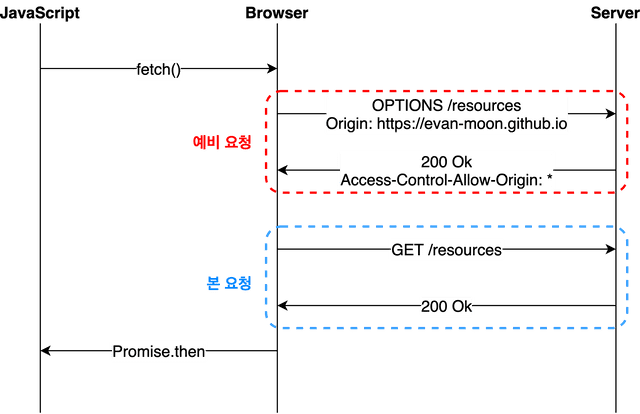
- 예비요청에 대한 서버의 응답헤더
- Access-Control-Allow-Origin: https://evanmoon.tistory.com
- 리소스 접근은 오직 https://evanmoon.tistory.com 뿐이라고 브라우저에게 알림
- 요청을 보낸 출처 https://evan-moon.github.io는 서버가 허용한 출처와 다르므로
- 브라우저는 CORS 정책을 위반했다고 판단하여 에러를 내보낸다.
//response header
OPTIONS <https://evanmoon.tistory.com/rss> 200 OK

Access-Control-Allow-Origin: <https://evanmoon.tistory.com>
Content-Encoding: gzip
Content-Length: 699
Content-Type: text/xml; charset=utf-8
Date: Sun, 24 May 2020 11:52:33 GMT
P3P: CP='ALL DSP COR MON LAW OUR LEG DEL'
Server: Apache
Vary: Accept-Encoding
X-UA-Compatible: IE=Edge
//error
Access to fetch at ‘<https://evanmoon.tistory.com/rss’> from origin ‘<https://evan-moon.github.io>’ has been blocked by CORS policy: Response to preflight request doesn’t pass access control check: The ‘Access-Control-Allow-Origin’ header has a value ‘<http://evanmoon.tistory.com>’ that is not equal to the supplied origin. Have the server send the header with a valid value, or, if an opaque response serves your needs, set the request’s mode to ‘no-cors’ to fetch the resource with CORS disabled.
- Simple Request
- 예비 요청 X
- 바로 본 요청

- Credentialed Request
- CORS의 기본 방식은 아니고, 다른 출처 간 통신에 보안을 강화하고 싶을 때 사용
- Front는 요청에 credentials 설정을 포함하여 전송해야 한다.
- credentials 설정을 포함하면, CORS 정책 위반 여부 검사에 두 가지 룰 추가
- 응답 헤더에는 반드시 Access-Control-Allow-Credentials: true가 존재해야 한다.
- Access-Control-Allow-Credentials: true 면 Access-Control-Allow-Origin 에 * 을 사용할 수 없고, url이 명시되어야 한다.
- credentials: 'include' 옵션의 의미
- 동일 출처 상관 없이 무조건 요청에 인증 정보가 포함되도록 설정
- 요청에는 브라우저의 쿠키 정보가 담겨있다.
- 구글 크롬 브라우저
- credentials 기본값이 same-origin이기 때문에,
- 포트 3000에서 4000으로 보내는 리소스 요청에 쿠키는 담기지 않는다.
- credentials: 'include' 설정해주면 다른 도메인이라도 쿠키 전송할 수 있다.
//axios
axios.post(url, {
  withCredentials: true
})
//fetch
fetch(url,{
  method: 'POST',
  mode: 'cors',
  credentials: 'include'
})